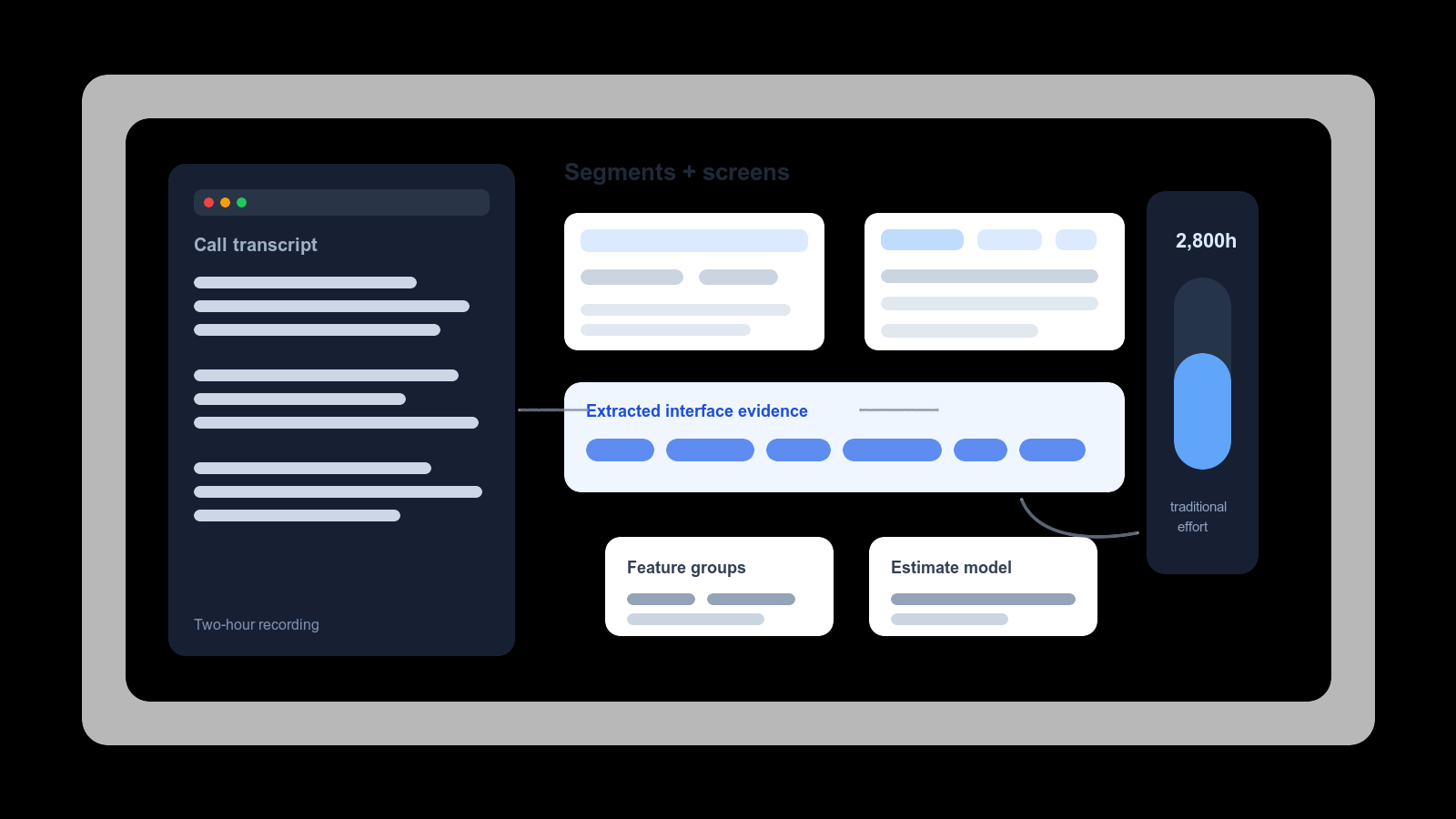
The most useful planning work I have done with AI so far started with a two-hour client call, not a specification document.
The client walked through an existing system that needed to be rebuilt, then showed mock-ups of the new system they wanted to build around it. There were screens, field names, workflows, business rules, and a lot of small comments that mattered more than they sounded in the moment. Anyone who has scoped software for long enough knows the type: a sentence that takes five seconds to say and quietly implies a permission model, an import process, and three admin screens.
In the old version of this process, I would have come out of that call with notes, a rough sense of the shape, and a long second pass ahead of me. Rewatch the recording. Pull out requirements. Group them by feature. Check the screenshots. Turn the conversation into a work breakdown. Then, after all that, start estimating.
This time I treated the recording as source material from the beginning.
The Input Was Messy, But Structured Enough
The call was not a formal requirements workshop. It was a real client conversation. That means it had context, examples, detours, implied rules, and a few things everyone in the room understood well enough not to say out loud.
But it was also much better than a vague briefing. The client was sharing screens. The topics stayed reasonably separated: existing-system walkthrough first, new-system mock-ups after that. Questions were asked while the relevant screen was visible. That gave the transcript enough shape to be useful later. The model was not inventing the project from a blank page; it was working over a conversation that already contained the raw material.
First, Transcribe the Call
The recording went through AWS Transcribe. That sounds like a small operational detail, but it changes the intake process. In my experience, the turnaround is much faster than the transcription built into Google Workspace or Zoom, and the output is better when you need to move quickly rather than wait for the meeting platform to catch up. A two-hour recording becomes searchable text quickly and cheaply. Once the transcript exists, I can segment it, quote it back to the client, compare statements made forty minutes apart, and stop relying on the quality of notes taken while I was also trying to listen, ask questions, think about architecture, and notice missing data.
A transcript is not perfect. Names are misheard, product terms get mangled, and some context still lives in the screenshots rather than the words. But it is a much better starting point than memory dressed up as certainty. The meeting stops being a one-off event and becomes a source file I can interrogate.
Then Split the Conversation Into Blocks
The first useful pass was not estimation. It was segmentation. I asked Claude to split the transcript into time blocks by topic, not by equal length: existing system area, new screen, workflow, administration, search, import, reporting, and wherever the conversation naturally moved next.
That gave me a usable map of the call. Instead of treating the whole two hours as one recording, I could jump back to the relevant timestamp, inspect the shared screen, and ask more detailed questions of that part of the transcript. This matters because a long discovery call is not one thing. It is a stack of smaller conversations, and the estimate gets better when those smaller conversations are separated.
The first useful output was not the estimate. It was a navigable version of the call.
Extract Screens, Fields, and Display Rules
The next pass was more concrete, and this is where the workflow became less like note-taking and more like building a small analysis pipeline.
I did not manually inspect every screenshot and type out every field. I asked Claude to write temporary scripts that looped through the transcript segments and the screen captures, extracted visible text from the mock-ups, grouped the results by time block, and gave me a fuller picture of what had actually been shown. Screen by screen: fields, labels, tabs, table headings, filters, status values, actions, and bits of interface copy that would otherwise be easy to miss.
This is the work that quietly eats estimation time. A mock-up might show one table, but the table implies sorting, filtering, permissions, empty states, validation, relationships, imports, exports, and probably a few admin screens nobody has drawn yet. The scripts helped collect that raw material without me doing the slow clerical pass by hand.
The transcript alone was not enough. A client can say "then they filter the list" while the screen quietly shows six filters, two status values, and a date range. If you estimate from the sentence, you undercount. If you estimate from the screen without the conversation, you miss why those fields matter. Putting transcript segments and extracted screen text together gave me a better first draft of the application shape.
The important step was still not accepting that draft. It was challenging it. Is this really one feature or three? Is this field just display text, or does it need to be queryable? Is this relationship already present in the legacy system, or does the rebuild have to create it? Does this screen imply a workflow, or just a view? Those are still engineering questions. The difference is that I was asking them against a collected body of evidence rather than a blank page and a folder full of screenshots.
Group Requirements Into Feature Areas
Once the transcript and screens were broken into useful pieces, Claude grouped the material into requirement areas. In practical terms, this was a text-grouping task: take the call, the screens, the field lists, and the observed workflows, then cluster them into feature areas that could become a work breakdown structure.
I do not mean that the grouped output was ready to use untouched. It was not. Some areas were too broad, some were too optimistic, and some needed to be split because rebuild work and new functionality had been mixed together. But it gave me a full-width first pass across the material. That is the tedious part of planning that is easy to postpone and expensive to do from memory.
For some feature areas, I also used existing software as a comparison point. One area was effectively a job board for volunteers and mentors. Rather than estimate that from scratch, we compared the required behaviour to a platform like Upwork: profiles, opportunities, matching, applications, messaging assumptions, notifications, workflow states, administration, and trust controls. Then we removed the parts this project did not need. It is easier to estimate a reduced version of a known product pattern than to stare at a custom feature name and pretend the words are enough.
From there, the estimate became possible:
- identify the major feature areas
- split large areas into smaller components
- assign rough effort per area
- compare complex areas with known product patterns
- remove features the project explicitly did not need
- look for shared infrastructure and repeated patterns
- separate rebuild work from genuinely new system work
- review the totals against experience
The result was a project plan of roughly 2,800 hours of traditional software effort.
What the 2,800-Hour Number Means
The 2,800-hour number needs careful framing. It was not a promise that every requirement had been discovered, and it was not a fixed-price quote with nicer formatting. It was a structured planning number: based on the call, the screens, the visible workflows, the field-level detail, and my review of the resulting feature map, this was the approximate traditional effort implied by the project as we understood it at that point.
That phrasing is clunky because the distinction matters. Software estimates are not measurements. They are models. The useful question is not whether the model is exact on the first pass; it never is. The useful question is whether the model is explicit enough to inspect, challenge, and improve. This one was, because the work breakdown was tied back to actual parts of the call rather than floating above it as a confident summary.
The Human Review Did Not Go Away
The biggest mistake would be to treat the generated output as the estimate. I treated it as the material to review. It found structure quickly, but it did not know which parts were commercially risky. It did not know where clients usually change their minds. It did not know which innocent-looking import task would become a week of data cleanup. It did not know which screens would create permission problems later.
That review layer is not optional. It is the difference between using AI as a planning assistant and outsourcing judgement to a spreadsheet-shaped paragraph. I still had to look at the feature areas and ask whether the totals felt credible, whether anything had been double-counted, whether obvious infrastructure was missing, and whether the estimate matched the kind of work I have actually delivered before.
What It Still Missed
This method still missed work. It captured visible user-facing requirements reasonably well, but it was weaker on the implementation work that sits underneath the screens: import complexity, framework setup, security hardening, deployment infrastructure, review environments, seed data, and the remediation that follows real review.
That is not a new problem. It is the standard estimation failure: the feature is visible, the supporting system is not. What changed for me is that the first planning pass became cheap enough to run a second, more sceptical pass deliberately looking for what the first one missed. Next time I would make that second pass explicit instead of assuming it would naturally fall out of the feature breakdown:
- What data must be imported?
- What security model is implied?
- What infrastructure must exist before this can be reviewed?
- What seed data and test data are required?
- What framework or tooling decisions are being assumed?
- What parts of the legacy system are not visible in the screens?
That second pass is where the estimate improves, because it forces the plan to account for the work that clients rarely ask for directly but every production system needs.
What I Took Into the Next Call
The practical value showed up in the next conversation with the client. I was no longer going back with a loose summary and a request for "more detail". I had a feature map, a rough effort model, and a list of the areas that looked expensive or unclear.
That changed the quality of the follow-up. I could say: this looks like the major rebuild area, this looks like new functionality, this part depends on legacy data, this part probably needs its own security model, and this import work is not a footnote. That is a very different conversation from "I will go away and think about it."
It also gave me a better way to test the estimate. Instead of defending a number, I could test the structure underneath the number. Which feature areas were wrong? Which screens had been misunderstood? Which workflows had been treated as simple when they were not? Which parts of the existing system had not been shown at all?
That is where the two-hour call became commercially useful. It did not produce the final answer. It produced a first map detailed enough to correct while the context was still fresh.
Where This Fits in the Larger Bet
This article sits after the 8x article for a reason. The first article was about a smaller proof point: I had seen the multiplier hold on bounded CRUD and business-application work. This one is about whether that experience could be used to take on something larger without kidding myself.
The answer was not a slogan about AI changing everything. I could get from a two-hour discovery call to a structured work breakdown much faster than before, then use my own experience to challenge the shape, the hidden work, and the risk. That gave me enough confidence to move from a promising 8x proof point into a much larger project, with my eyes at least partly open.
The 2,800-hour estimate was not the end of the planning process. It was the first useful work breakdown. The next step was finding the implementation work it still undercounted.